Creating a framework
After you have added all the content (data you want to visualize, such as key surfaces, well markers etc.) to your map and cross section, you create a framework which contains items like the scale bar, the legend and the title amongst others, to describe what is displayed on the map.
Setting up a framework
Upon opening a new CoView, the map, North arrow, and scale bar elements are available on the canvas by default. The two most important elements of the CoView are the map and the cross section, which are used to visualize the data of interest.
All the framework elements that are available are listed in the Add to Framework drop-down list opened via green plus button  in the toolbar of the view. An alternative way to add elements to the framework is by right-mouse clicking anywhere in the view (not on an element) to open the context menu and select Add to Framework.
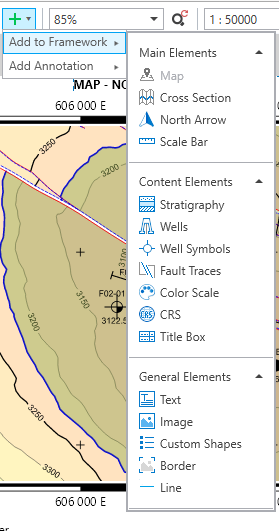
You can add as many elements as you want to build up a framework for your map. click to enlarge
You can combine the framework elements. For example, you can combine the border element with color scale, you can combine the map with the North arrow and the scale bar, or any other combination of elements. For your convenience, you can then group these combined elements in the Framework tab in the CoView Manager so you can move them around on the map in one go.
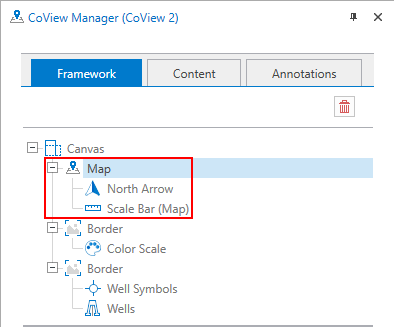
In the CoView Manager, you can group the elements of the framework. To group elements, you drag and drop them. click to enlarge
When you are done setting up your framework, you must save it using the Save button  in the toolbar of the CoView. This opens a dialog where you can enter a name. Click OK to save the framework with the name you have just entered. Once you have saved your framework, the framework is updated and saved automatically whenever you make a change.
Frameworks are saved and stored in the Framework Manager which is available via the button  in the toolbar of the CoView. You can import, export, duplicate, rename and delete frameworks. You can also create a new framework using the Framework Manager.